

Free Letterhead Maker: Create a Professional Letterhead Online in 2 Minutes (No Signup)
Create professional letterheads with your logo, business details, custom colors, styles and watermarks—all directly in your browser, with no signup or data storage.
Free Business Letterhead Generator
Fill in your details, style it, and download a print-ready PDF. No signup.
Country / region
Company
Business IDs (optional)
Contact
Footer
Colour theme
Layout
Letter body (optional)
Paper size
Saving
TL;DR
- A letterhead generator builds the top (and sometimes bottom) of your business letters: logo, name, address, contact details.
- Our free letterhead maker runs in your browser. No signup. No login. We do not store your data.
- Add your own logo, change colors and styles, and even add your own watermark.
- Use it for resignation letters, cover letters, offer letters, address change notices, payment reminders, and any formal or informal letter.
- Download a clean, print-ready PDF with no tool watermark.
Quick Answer: What Is the Easiest Way to Make a Letterhead Online?
The easiest way is to use a browser-based letterhead generator. Enter your business details, upload your logo, pick your colors, write your letter, and download it as a PDF. With our free letterhead maker, the whole process takes about two minutes and needs no account.
Your Letter Is Judged Before It Is Read
You need a free letterhead maker, and you need it now.
Maybe you are resigning and want the notice to look official. Maybe a client is 30 days late on an invoice. Maybe you just moved your shop and need to tell every customer.
Here is the good news. A professional letterhead no longer needs a designer, a Word template hunt, or a $20 monthly subscription. A good letterhead generator does the job in minutes, right in your browser.
This guide shows you exactly how to use our letterhead maker online, what to put on a letterhead, and how to write four of the most common letters people send: resignation, cover letter, change of address, and payment reminder.
Stay with me. A few small details (like margin size and file format) quietly decide whether your letter looks sharp or sloppy. We will cover those too.
What Is a Letterhead? (And Why Does It Still Matter?)
A letterhead is the heading at the top of a sheet of letter paper. It usually shows a person’s or organization’s name, address, and logo. It tells the reader who sent the letter and signals that the message is official.
The concept is old. Wikipedia’s letterhead entry describes it as the heading at the top of a sheet of letter paper, typically carrying a name, address, and often a logo, with some designs also using the footer or margins.
But is it still relevant when most communication happens by email?
Yes. Here is why.
- A branded letter looks like it came from a real business.
- Banks, landlords, embassies, and HR teams often want a letter on official paper.
- Your letters, invoices, and quotes all look like they belong together.
- PDF-first world. Most letters now travel as PDF attachments, so a digital letterhead matters more, not less.
If you already send invoices, a matching letterhead is the natural next step. You can pair it with our free invoice generator and receipt generator so every document carries the same look.
Why Use a Free Letterhead Maker Instead of Word or Canva?
Word templates work. Canva works. So why choose a dedicated letterhead generator?
Because most people do not want to design. They want a finished letter.
A focused free letterhead maker removes the friction:
- No account to create
- No template library to dig through
- No formatting that jumps around when you edit
- No tool logo stamped on your document
Here is a quick comparison.
Our Free Letterhead Maker
- No signup required
- Runs in your browser
- No data stored on a server
- No tool watermark
- Add your own logo
- Write the letter in the same tool
- About 2 minutes for a simple letter
Word Templates
- No signup required
- Needs software installed
- Saves as a local file
- No tool watermark
- Add your own logo
- Write the letter in the same file
- About 10–20 minutes
Design Apps
- Account often required
- Runs in browser
- Data usually stored on a server
- Watermark sometimes added on free plans
- Add your own logo
- Limited letter writing
- About 10–30 minutes
Expert insight: The biggest time-waster with template downloads is not design. It is fixing broken formatting after you paste your text. A letterhead generator that keeps the header and body together avoids that problem completely.
Paid design tools still win for complex brand work like brochures. For letters, a simple online letterhead generator free of charge is usually enough.
How to Use the Letterhead Generator (Step by Step) ?
To make a letterhead online, open a letterhead generator, add your business name and contact details, upload your logo, choose colors and layout, type your letter, and download the PDF.
Here is the full walkthrough.
- Open the free letterhead maker. It loads in your browser. You do not need to sign up or log in.
- Enter your details. Add your name or business name, address, phone, email, and website.
- Upload your logo. A letterhead with logo online looks far more credible. Use a PNG with a transparent background if you can.
- Pick your colors and style. Match your brand colors. Keep it simple. Two colors is plenty.
- Choose your layout. Place the logo left, centered, or right. Decide if you want a footer line.
- Add an optional watermark. Want a faint logo behind the text, or a word like CONFIDENTIAL? You can add your own watermark.
- Write your letter. Type the date, recipient, subject, body, and sign-off right inside the tool.
- Check spelling, spacing, and alignment.
- Download as PDF. Save it, print it, or attach it to an email.
That is it. No account. No waiting for an email confirmation.
Is My Data Safe When I Use This Letterhead Maker Online?
Short answer: your data stays with you.
The tool works directly in your browser. We do not store your letter, your logo, or your business details. When you close the tab, the information is gone unless you saved the PDF yourself.
This matters for sensitive letters like resignations and payment disputes. You should never have to hand those to a stranger’s server just to get a nice header.
What to Include in a Business Letterhead ?
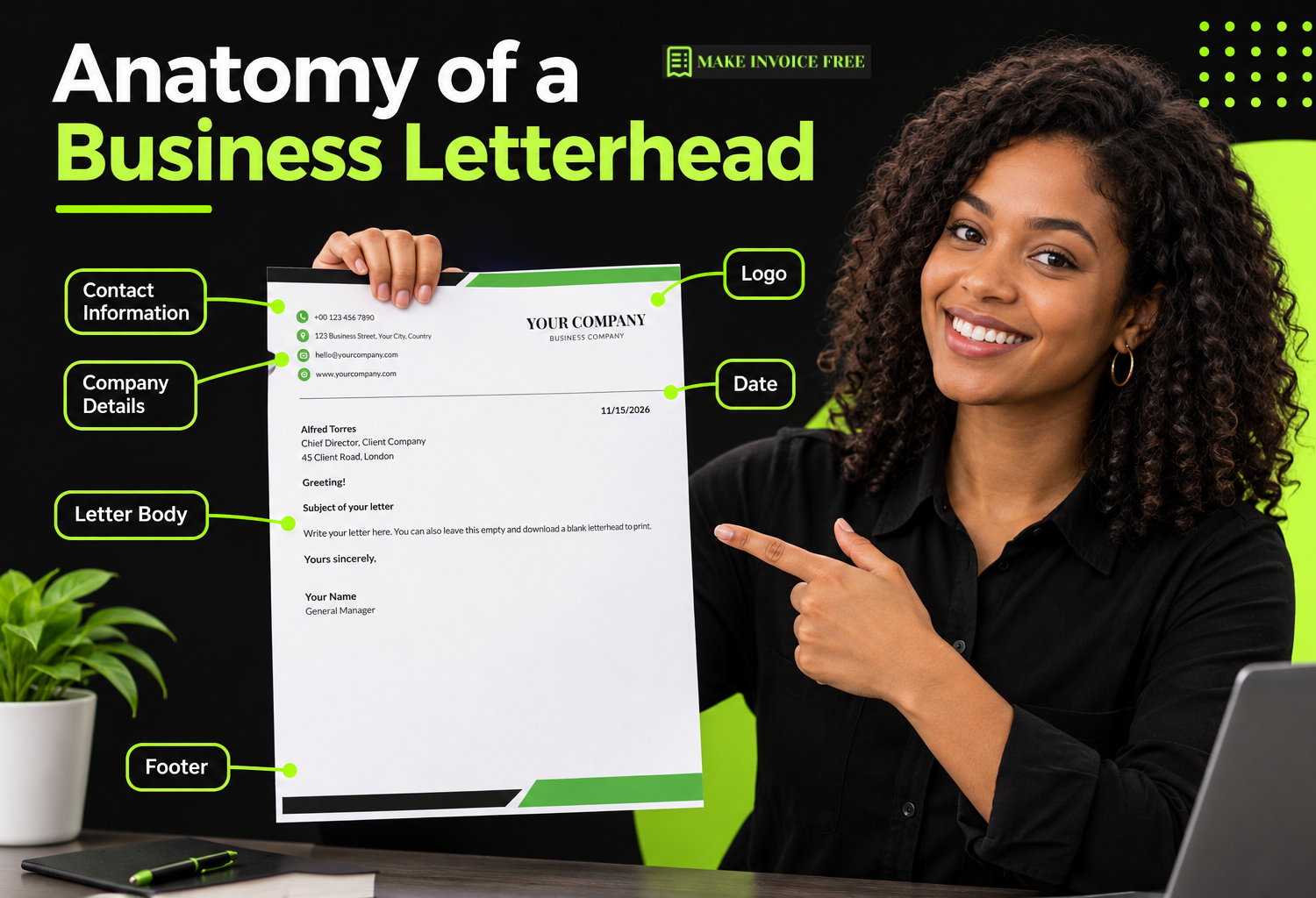
A business letterhead should include your company name, logo, address, phone number, email, and website. Depending on your country, it may also need a registration number or tax ID.
- Business or personal name (required): Use your legal or trading name.
- Logo (recommended): A high-resolution PNG or SVG works best.
- Street address (required): Full mailing address.
- Phone number (required): Add the country code if you write internationally.
- Email address (required): Use a branded email if possible.
- Website (recommended): Short URL, no tracking junk.
- Registration or tax number (depends on country): Often required by law in some places.
- Tagline (optional): Keep it short or skip it.
- Footer line (optional): A good place for legal details.
One pattern I see all the time: people cram everything into the header. Then the letter body starts halfway down the page.
Pro tip: Keep the header under about 1.5 inches tall. Put registration numbers and legal text in a slim footer instead.
Letterhead Size, Margins, and Fonts (A4 vs US Letter)
This is where many people trip up.
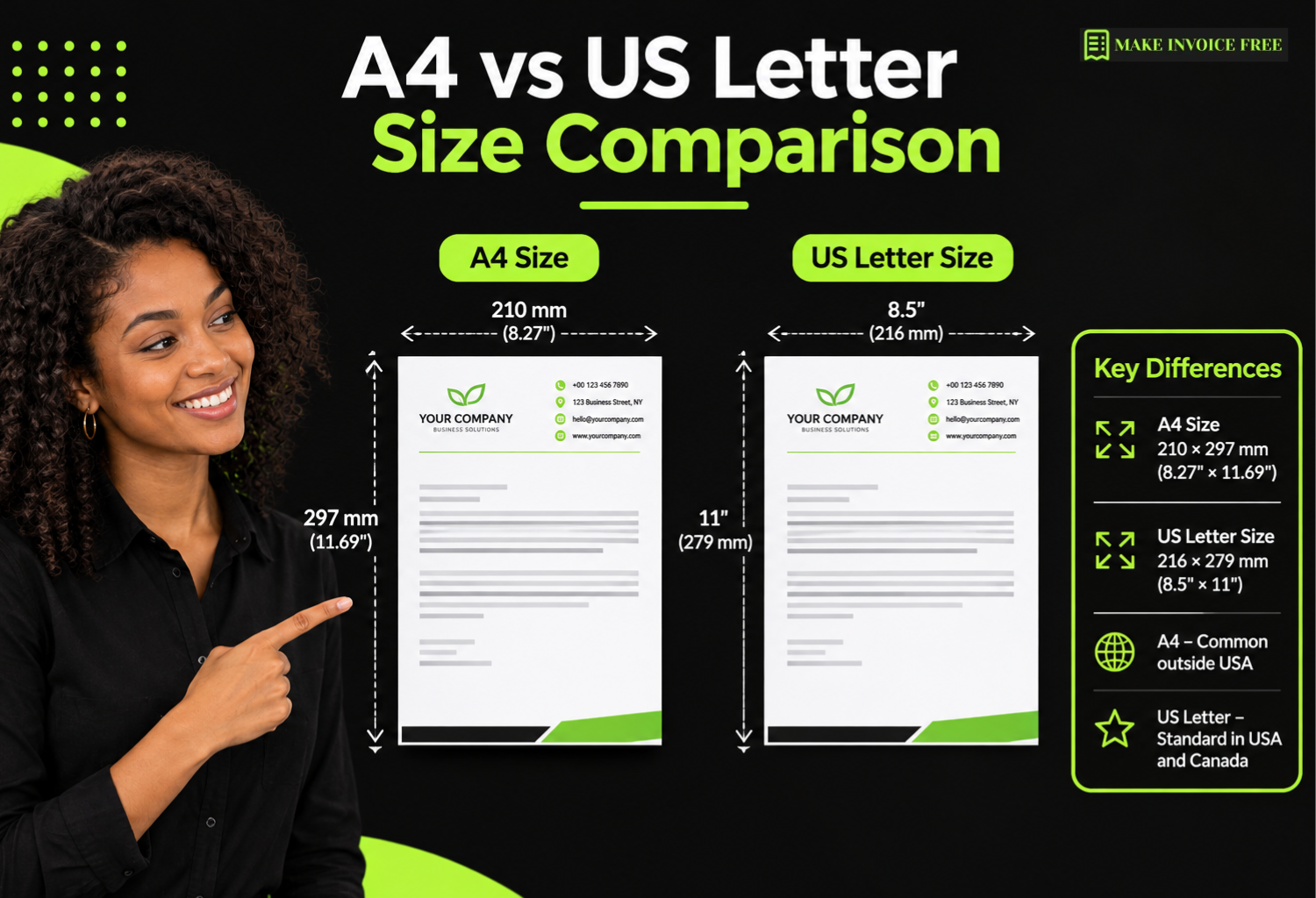
The US and Canada use Letter size. Most of the rest of the world uses A4. If you pick the wrong one, your PDF may print with cut-off edges or odd gaps.
- US Letter (8.5 × 11 inches): Used in the US and Canada.
- A4 (210 × 297 mm): Used in the UK, Ireland, EU, Australia, NZ, India, South Africa, UAE, and Singapore.
If you want a business letterhead generator A4 layout for an international audience, choose A4. If your reader is in the US, choose Letter.
Margin and Font Basics
- Margins: About 1 inch (25 mm) on all sides is a safe default.
- Body font: 10–12 pt. Readable fonts like Arial, Calibri, Georgia, or Times New Roman work well.
- Header font: One step larger than the body, or bold for the business name.
- Line spacing: Single or 1.15.
- Colors: Dark text on white. Save color for the header accent.
Expert insight: If you will print on a home or office printer, avoid heavy color blocks that run to the paper edge. Most printers cannot print edge to edge, so they leave a white border and make the design look cheap.
Letterhead Generator Use Cases: What Can You Write With It?
A good free letterhead maker is not only for “official business letters.” It is a general letter tool with a professional header.
People commonly use it for:
- Resignation letters
- Cover letters
- Offer letters
- Change of address notices
- Payment reminder letters
- Formal and informal letters
- Reference and recommendation letters
- Quotation cover letters
- Client announcements and thank-you notes
Let’s walk through the big four, with ready-to-adapt examples.
Resignation Letter on a Letterhead (With Notice Period Template)
A resignation letter formally tells your employer you are leaving. It should state your last working day, mention your notice period, thank the employer, and stay short and professional.
Why Put a Resignation Letter on Letterhead?
If you own a company or contract through one, a resignation on your own letterhead looks official. If you are an employee, a simple personal letterhead with your name and contact details still looks more polished than plain text.
Searches like resignation letter on company letterhead and resignation letter with letterhead are common for exactly this reason. People want the letter to be taken seriously.
How Long Should the Notice Period Be?
It depends on your contract and country.
- United States: Two weeks is the common courtesy, and many employment relationships are at-will. Always check your contract.
- UK, Ireland, Australia, EU, and others: Notice is often set by your contract or local law. It can be a month or more.
- India, UAE, Singapore: Contracts often specify 30–90 days.
When in doubt, read your employment agreement first.
Resignation Letter Format With Notice Period (Template)
[Your Name] [Your Address] [Phone] | [Email]
[Date]
[Manager’s Name] [Company Name] [Company Address]
Subject: Resignation – [Your Name]
Dear [Manager’s Name],
Please accept this letter as formal notice of my resignation from my role as [Job Title] at [Company Name]. My last working day will be [Date], in line with my [two-week / 30-day / contractual] notice period.
Thank you for the opportunities and support I have received here. I have learned a great deal and I am grateful for it.
I will do my best to complete my current work and help hand over my responsibilities before I leave. Please let me know how I can make the transition smooth.
Sincerely, [Signature] [Your Name]
Two Weeks Notice Letter Template With Letterhead (Short Version)
Dear [Name],
This letter is my two weeks notice. My last day will be [Date]. Thank you for the experience and support. I am happy to help train a replacement or document my work before I go.
Best regards, [Name]
Simple works best. You do not owe an explanation.
Resignation Letter Mistakes to Avoid
- Venting about your manager or coworkers
- Forgetting the last working day
- Skipping the date
- Sending it only by text or chat
- Writing three pages when three paragraphs will do
Pro tip: Download the resignation letter PDF and keep a copy. Having a dated record protects you if there is ever a dispute about when you gave notice.
Cover Letter on Letterhead: Make Your First Impression Match Your Resume
A cover letter on letterhead uses a clean header with your name and contact details, followed by a short, tailored letter. Match the header design to your resume so both documents look like a set.
Most job seekers pour hours into the resume and slap a plain cover letter on top. That is a missed chance.
A matching cover letter header design tells the recruiter you pay attention to detail. It also makes your application feel like one coordinated package.
How to Design a Cover Letter Header
- Use your name as the largest text, in a clean font
- Add phone, email, city, and LinkedIn on one or two lines
- Use one accent color that also appears on your resume
- Skip photos unless you apply in a region where they are standard
- Keep the header slim
You can build all of this with the free letterhead maker, then write the letter right below it.
Cover Letter Template (Professional)
Dear [Hiring Manager’s Name],
I am excited to apply for the [Job Title] position at [Company]. With [X years] of experience in [field], I have [one concrete result, like “cut reporting time by 30%”].
At [Previous Company], I [specific achievement]. I would bring the same focus to your team, especially around [a need mentioned in the job post].
I would love to talk about how I can help [Company] reach its goals. Thank you for your time and consideration.
Sincerely, [Your Name]
Cover Letter Generator Free vs Writing It Yourself
A cover letter generator free tool can give you a rough draft. But recruiters can spot generic text quickly.
Use a letterhead generator for the polished look. Then personalize every cover letter with real numbers and the company’s own language.
Expert insight: Hiring teams often skim a cover letter in seconds. A strong first sentence and one measurable result beat three paragraphs of general praise.
Change of Address Notice Letter: Tell Customers and Vendors You Moved
A change of address letter for a business tells customers, vendors, and partners your new location and the date it takes effect. State the old address, the new address, the effective date, and whether phone, email, and bank details stay the same.
Moving a business creates a quiet risk. Invoices go to the wrong place. Packages vanish. Clients call the old number and give up.
A clear business address change notice template prevents all of that. And because it is a formal announcement, it belongs on your letterhead.
This is where a free letterhead maker really earns its keep. You can generate one letterhead, then reuse it for every recipient.
What to Include in a Company Relocation Announcement Letter
- Your business name and logo (in the header)
- The date of the letter
- Your old address
- Your new address and the effective date
- Confirmation that phone, email, and website are unchanged (or the new ones)
- Any change to the billing or remittance address
- A friendly thank-you and a contact for questions
Change of Address Letter to Customers (Template)
Subject: We are moving – new address effective [Date]
Dear [Customer Name],
We are excited to share that [Company Name] is moving to a new location. Starting [Date], you can find us at:
[New Address]
Our phone number, email, and website stay the same. Our hours will continue to be [Hours].
Thank you for being part of our journey. We look forward to welcoming you in our new space.
Warm regards, [Name], [Title]
Change of Address Letter to Vendors and Suppliers (Template)
Vendors need different details. They care about shipping and payments.
Subject: Notice of change of business address – effective [Date]
Dear [Vendor Name],
Please note that [Company Name] has changed its business address. Effective [Date], please update your records as follows:
Billing address: [New Billing Address] Shipping address: [New Shipping Address]
Please send all future invoices, purchase confirmations, and correspondence to the new address. Our tax ID and bank details remain unchanged.
Kindly confirm that you have updated your records. Thank you for your continued partnership.
Sincerely, [Name], [Title]
Expert insight: Send the vendor version at least two to four weeks before you move. Accounts payable teams update records slowly, and one missed update can delay a payment.
Change of Address Mistakes to Avoid
- Sending the notice after the move
- Forgetting to mention the billing address
- Not updating your website, Google Business Profile, and email signature
- Skipping a PDF copy for people who want to file it
Pro tip: Update the address on your invoices, too. If you use our free invoice generator, change it once and every new invoice carries the correct location.
Payment Reminder Letter on Letterhead: Get Paid Without Burning the Relationship
A payment reminder letter politely asks a client to pay an overdue invoice. It should include the invoice number, amount, original due date, how to pay, and a clear new deadline. Start friendly and escalate only if needed.
Late payments hurt. They mess up cash flow, and chasing money feels awkward.
If you are a freelancer, a gig worker, or a small business owner, you know the feeling. You did the work. The invoice is overdue. And you do not want to lose the client.
The right letter solves both problems. And a payment reminder letter with letterhead looks far more serious than a casual chat message, which is often enough to get a reply.
The Payment Reminder Ladder: Which Letter to Send When
Do not start aggressive. Escalate in steps.
- Friendly nudge (1–7 days overdue): Warm and casual. Goal: remind them it slipped.
- Polite reminder (14–15 days overdue): Goal: confirm they received the invoice.
- Firm notice (30 days overdue): Goal: set a clear deadline.
- Final notice (45–60 days overdue): Formal and serious. Goal: state your next steps.
These timings are common practice, not rules. Adjust them to your contract and payment terms.
Polite Payment Reminder Letter to a Client (Template)
Subject: Friendly reminder – Invoice #[Number]
Hi [Client Name],
I hope you are doing well. This is a quick reminder that invoice #[Number] for [Amount], due on [Due Date], is still outstanding.
You can pay by [payment method/details]. If you have already sent it, thank you, and please ignore this note.
Please let me know if you have any questions about the invoice.
Best, [Name]
30 Days Overdue Invoice Letter (Template)
Subject: Overdue payment – Invoice #[Number]
Dear [Client Name],
Our records show that invoice #[Number] for [Amount], issued on [Date] and due on [Due Date], is now 30 days overdue.
Please arrange payment by [New Deadline]. A copy of the invoice is attached for your convenience.
If there is a problem with the invoice, let me know right away so we can resolve it.
Sincerely, [Name]
Final Notice for Unpaid Invoice (Template)
Subject: Final notice – Invoice #[Number]
Dear [Client Name],
Despite previous reminders, invoice #[Number] for [Amount] remains unpaid, now [X] days past due.
Please pay the full amount by [Final Date]. If we do not receive payment or hear from you by then, we may apply late fees as stated in our agreement and consider further steps to recover the balance.
We would prefer to settle this directly. Please contact me today.
Regards, [Name]
A Quick Note on Late Fees and Interest
Only charge late fees if they appear in your contract or invoice terms. Rules also vary by country. For example, the UK has statutory late payment interest for business-to-business debts, and the EU has a Late Payment Directive covering commercial transactions.
This is general information, not legal advice. For a large unpaid amount, speak with a local lawyer or a qualified advisor.
Late Payment Letter for Freelancers: What Actually Works
Freelancers often feel they cannot push. But clear, calm wording works better than apologies.
- Name the invoice number and amount in the first sentence
- Give one specific deadline
- Offer an easy way to pay
- Keep emotions out of it
- Save a PDF of every reminder as a record
Expert insight: Most late invoices are not refusals. They are forgotten emails, approval delays, or lost attachments. A friendly first reminder with the invoice attached resolves a surprising number of cases.
The cleanest workflow is simple. Create the invoice with our free invoice generator, send the reminder on your letterhead, and issue a proof of payment with the receipt generator once the money lands.
More Ways to Use a Free Letterhead Maker (Use Cases We Validated)
Beyond the big four, these use cases make sense because people regularly need them on branded paper.
- Offer letter: Formal job offers look official. Search phrase: offer letter template with letterhead.
- Reference letter: Carries the employer’s authority. Search phrase: reference letter on company letterhead.
- Employment verification: Banks, visa offices, and landlords often ask for it. Search phrase: employment verification letter template.
- Quotation cover letter: Pairs with a price quote. Search phrase: quotation cover letter format.
- Thank-you or client appreciation letter: Builds relationships. Search phrase: business thank you letter template.
- Formal and informal letters: General professional and personal use. Search phrase: formal letter format with letterhead.
- Notice or announcement: Price change, holiday closure, or policy update. Search phrase: business notice template.
Every one of these is a letter that benefits from a header with a logo and contact details. If you can type it, you can put it on letterhead.
Letterhead Rules by Region: What Many Countries Expect
Freelancers and companies often write to clients in other countries. That means different expectations.
- United States and Canada: Use Letter size. Date format is usually month-day-year. Legal details on a letterhead are not generally mandatory for simple letters.
- United Kingdom: Companies must show certain details on business letters, such as their registered name, registration number, and registered office address. Check the official government guidance for your company type.
- European Union: Many member states require company registration details on business correspondence. Rules differ by country, so verify locally.
- Australia and New Zealand: Businesses typically include their ABN or NZBN on formal business documents. Check the relevant tax authority.
- India: Companies commonly add CIN or GSTIN on the letterhead footer, depending on the letter type.
- UAE, Singapore, South Africa, Ireland: Business registration or tax numbers are commonly shown. Confirm what applies to your entity.
Expert insight: When in doubt, put the registration number in a small footer line. It costs nothing, looks professional, and keeps you on the safe side.
Laws change, so treat this as a starting checklist and confirm with an official source or an accountant.
Common Letterhead Mistakes (And How to Fix Them)
I have seen these over and over.
- A giant header. It pushes your letter down the page. Keep it slim.
- A blurry logo. Low-resolution images look fuzzy in a PDF. Upload a larger file.
- Too many fonts. Use one font family. Two at most.
- Neon or heavy colors. They hurt readability and print badly.
- Outdated details. An old phone number or address defeats the point.
- Wrong paper size. A4 and US Letter are not interchangeable.
- Watermark too dark. A watermark should be faint so the text stays readable.
- No footer for legal info. Add it if your country expects it.
Not saving a PDF. Keep a copy for your records
Pro Tips for a Better Letterhead
- Use a transparent PNG logo. It blends cleanly with any background color.
- Match your invoice. Use the same colors and fonts across letters, invoices, and receipts.
- Test print one page in black and white before you send a batch.
- Keep a version without a watermark for formal use and one with a faint watermark for drafts.
- Name files clearly, like Resignation-Letter-Jane-Doe-2026.pdf.
- Use a subject line in every letter. Readers scan it first.
- Sign it. A scanned or digital signature adds authenticity.
How to Use a Watermark on Your Letterhead ?
A watermark is a faint image or text behind your letter content.
People use it for three reasons:
- Branding: a light version of the logo in the center
- Status: DRAFT, CONFIDENTIAL, or COPY
- Anti-misuse: discourages casual copying of a document
Our letterhead generator does not stamp its own mark on your file. The only watermark is the one you choose to add.
Keep opacity low. If the text behind it becomes hard to read, lower it.
Letterhead Trends for 2025–2026: What Is Changing
The basics stay the same, but habits are shifting.
- PDF-first delivery. Most letters are now emailed as PDFs rather than printed. Letterheads are designed for screens first.
- Minimal design. Clean headers with one accent color beat busy graphics.
- Mobile reading. Many recipients open attachments on phones, so readable font sizes matter more.
- Privacy-first tools. People are more careful about uploading sensitive documents. Browser-based tools that do not store data are gaining trust.
- Cross-border work. Freelancers and remote teams write to clients worldwide, so A4 and US Letter flexibility matters.
- AI-assisted drafting. Many people use AI to draft text, then place it on a branded letterhead for a professional finish. Always review and personalize anything an AI tool writes.
The trend is clear. People want fast, simple, private tools. That is exactly the idea behind a no-signup free letterhead maker.
Who Should Use This Letterhead Generator?
The tool is built for people who need professional documents quickly and cheaply:
- Freelancers and independent contractors
- Small business owners and startups
- Online sellers and creators
- Gig workers and side hustlers
- Self-employed professionals
- Companies that need quick, consistent letters
- Job seekers building a matching resume and cover letter
If your day involves sending invoices, receipts, and the occasional formal letter, this fits right into your workflow.
Frequently Asked Questions About the Letterhead Generator
What is the best free letterhead maker?
The best free letterhead maker is one that needs no signup, adds no watermark, lets you upload your logo, and exports a clean PDF. Our tool does all of that directly in your browser.
Can I create a letterhead online without signing up?
Yes. You can create a letterhead online with no signup and no login. Open the tool, enter your details, and download your file.
Is the letterhead generator really free?
Yes. It is a free letterhead generator. You can build and download letters without paying or creating an account.
Do you store my data or my logo?
No. The tool works in your browser, and we do not store your letters, logo, or business details.
Will the PDF have a watermark from your tool?
No. The letterhead generator no watermark approach means your document stays clean. You can add your own watermark if you want one.
Can I add my own logo to the letterhead?
Yes. Upload your logo and place it in the header. A transparent PNG usually looks best.
Can I customize colors and styles?
Yes. You can adjust colors, styling, and layout to match your brand.
What types of letters can I make?
Any letter. Common examples include resignation letters, cover letters, offer letters, change of address notices, payment reminders, and general formal or informal letters.
Is a letterhead letter legally valid?
A letterhead alone does not make a letter legally binding. It identifies the sender and looks official. Whether a letter has legal effect depends on its content, signatures, and local law.
What size should a letterhead be?
Use US Letter (8.5 × 11 inches) in the US and Canada. Use A4 (210 × 297 mm) in most other countries.
What should I write in a resignation letter on letterhead?
State that you are resigning, give your last working day, mention your notice period, thank your employer, and keep it brief.
How do I write a polite payment reminder letter?
Open with a friendly tone, name the invoice number and amount, state the due date, share payment details, and set a clear new deadline.
Can I use the letterhead on my phone?
Yes. The tool runs in a browser, so it works on phones, tablets, and computers.
Key Takeaways
- A letterhead gives your letters credibility, consistency, and an official look.
- A free letterhead maker saves time and money, especially for freelancers and small businesses.
- Our letterhead generator needs no signup, stores no data, and adds no watermark.
- Keep your header slim, your logo sharp, and your colors simple.
- Match paper size to your audience: US Letter or A4.
- Resignation, cover, address change, and payment reminder letters all look better on letterhead.
- Escalate payment reminders gradually, and keep a PDF record of everything.
- Check local rules about registration numbers and legal details on business letters.
Make Your Next Letter Look Professional in Two Minutes
A good letter does not need a design degree.
It needs a clean header, clear wording, and the right format. A free letterhead maker handles the first part. This guide covers the rest.
Try the letterhead generator on your next letter. Add your logo, pick your colors, write your message, and download the PDF. No account, no cost, and no data stored.
And when you are ready to get paid for the work, pair it with the free invoice generator and the receipt generator on Makeinvoicefree. One toolkit, one consistent professional look.