

Free Invoice Generator – Create Professional Invoices in Seconds
TLDR : It is a free invoice generator that lets you create and download professional invoices in seconds — no signup, no login, no data stored, no cost. Ever.
Start Creating Your Free Invoice in Seconds :
Bill From
Bill To
Currency
Invoice Details
Items
| Description | Qty | Price | Amount |
|---|
Pricing
Subtotal: 0
Discount: 0
Tax: 0
Shipping: 0
Total: 0
Notes
Yes, you can create a professional invoice for free right now — no account needed, no personal data collected, and no hidden fees. Just open the tool, fill in your details, and download your invoice as a PDF.
That’s it. Simple as that.
Why Most Invoice Tools Make It Way Too Complicated ?
Let’s be honest for a second.
You just finished a job. You delivered the work. Now all you want to do is send an invoice and get paid. That should take five minutes, right?
But then you search for an invoice tool online. And suddenly you’re being asked to create an account, confirm your email, pick a pricing plan, enter your credit card “just to start a free trial,” and sit through an onboarding tour you didn’t ask for.
By the time you’re done, fifteen minutes have passed and you still haven’t made your invoice.
This is the problem that this Invoice Tool was built to solve. Our free invoice generator skips every single one of those steps. There is no account. There is no login. There is no data stored on any server. You open the page, fill in your information, and download your invoice. Done.
That’s the whole experience — and honestly, that’s exactly how it should work.
What Is a Free Invoice Generator?
A free invoice generator is an online tool that helps you create a professional invoice without paying for expensive software or subscribing to a monthly service.
Instead of building an invoice from scratch in Word or struggling with a spreadsheet, a free invoice generator gives you a ready-made template. You simply fill in the details — your name, your client’s name, the services you provided, the amount owed, and the payment due date. Then you download it as a PDF and send it off.
It sounds simple because it is simple. And yet, so many tools overcomplicate it.
At Makeinvoicefree, the free invoice generator is designed to be the easiest, cleanest, and most private option available. There is nothing to install. Nothing to pay. And nothing tracked.
Who Actually Needs a Free Invoice Generator?
You might be surprised by how many people need a simple invoicing tool. This isn’t just for big businesses or agencies. The reality is that a free invoice generator is perfect for a very wide range of people.
Freelancers are probably the biggest group. Whether you are a writer, designer, developer, photographer, or video editor, you likely send invoices regularly. Paying for invoicing software when you’re just starting out — or when you only send a handful of invoices a month — makes no sense. A free invoice maker app or generator solves the problem without costing you anything.
Small business owners often need to send invoices but don’t want to commit to a subscription tool before they know what they actually need. A simple invoice generator lets them start sending professional invoices right away.
Self-employed tradespeople — plumbers, electricians, painters, carpenters — often work job to job. They need a fast, no-fuss way to invoice their clients. Our tool is built for exactly that kind of speed.
Consultants who work with multiple clients also benefit. Rather than managing a complex system, they can generate a clean invoice for each client in minutes.
Students and side hustlers who are just dipping their toes into freelance work for the first time don’t want to spend money before they even know if it will work out. The free invoice generator at makeinvoicefree gives them a professional tool with no financial risk whatsoever.
In short — if you have ever done work and needed to ask someone to pay you for it, this tool is for you.
The Big Problem With Most “Free” Invoice Tools
Here’s something you’ve probably noticed if you’ve searched for invoicing tools before.
A lot of them say “free.” But then you find out the truth. Some let you send only three invoices before locking you out. Others are free to use, but they stamp their logo all over your invoice — which looks unprofessional when your client receives it. A few tools are technically free, but they save your data on their servers and use it to pitch you paid upgrades.
People on platforms like Reddit often search for things like free invoice generator reddit recommendations specifically because they’ve been burned by these kinds of tools before. They want real, honest recommendations from people who have actually used something.
So let’s be completely upfront about what this Invoice Generator is and isn’t.
It is a genuinely free invoice generator. There are no invoice limits. There is no branding on your invoice. There is no signup wall. There is no paid tier being dangled in front of you.
And importantly — no data is recorded. When you fill in your invoice details, that information stays on your device. It is not sent to a server. It is not stored in a database. It is not used to send you marketing emails. It simply doesn’t go anywhere except your downloaded PDF.
That is a level of privacy you don’t often find in online tools. And it matters — especially when your invoices contain sensitive business information like client names, addresses, and payment details.
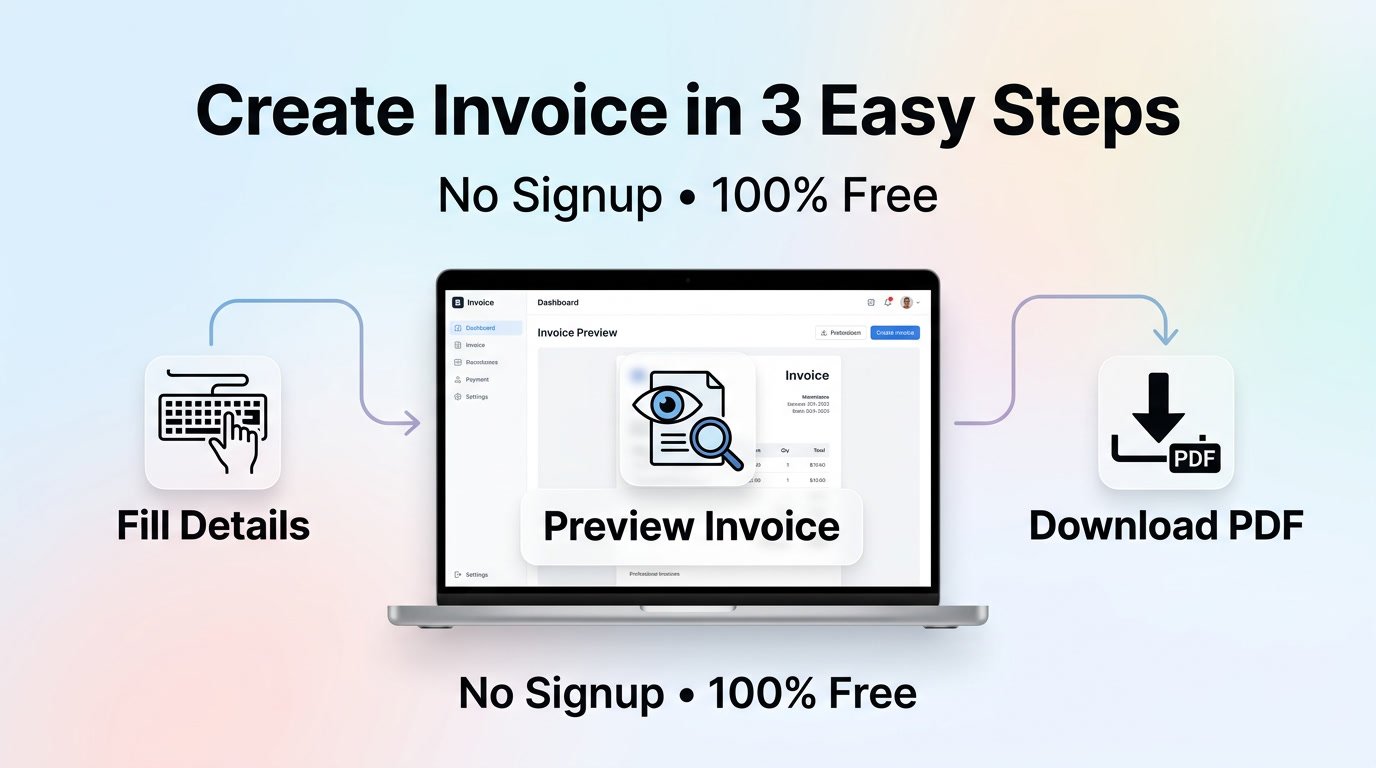
How to Use the Free Invoice Generator ?
Using this tool is genuinely easy. Here’s exactly what the process looks like.
Step 1 — Open the tool
Go to Invoice generator. The free invoice generator loads immediately. There is no waiting, no loading screen, and definitely no signup form.
Step 2 — Fill in your details
You’ll see a clean form where you can enter:
- Your name or business name
- Upload Your Company’s Logo (Optional).
- Your client’s name
- Select Your Currency.
- Entre Invoice Date and Due Date.
- Entre Invoice Number or Use Default.
- Enter PO Number.
- Then Entre Your Product or Service details,Quantity and Pricing.
- Then Choose Discount like do you want to give flat discount or discount on percent basis.
- Then add Tax Percentage.
- Then add Shipping Charges.
- Then Notes…You can add anything like Payment info,Terms,updates etx.
- Then Click Download and Download the Invoice.
The whole form is straightforward. If you’ve ever filled out a basic online form, you can use this tool without any help at all.
Step 3 — Download your PDF
When you’re happy with it, hit download. Your invoice saves as a PDF directly to your device. That’s the end of the process.
From start to finish, most people complete their invoice in under five minutes. In fact, once you’ve used the tool once, the second invoice takes even less time because you already know exactly what to fill in.
Is This Really Free? What’s the Catch?
There is no catch.
This is probably the question people ask most, and it’s a completely fair one. We live in a world where “free” almost always comes with a hidden cost — your data, your email address, your attention, or your patience.
So it’s worth explaining clearly.
makeinvoicefree.com runs as a free tool because keeping it free is the point. The tool costs very little to run. There are no servers storing your data, which means there’s no infrastructure cost for data storage. The tool is designed to stay lean, fast, and simple — and that keeps the cost of running it low enough that it can be offered for free.
No trial period. No invoice limit. No watermark. No email required. No credit card. Just a free invoice generator that does exactly what it promises.
What Makes This Better Than Other Free Invoice Tools?
There are quite a few options when you search for a free invoice generator software or a free invoice maker app. So what makes this one worth using?
It’s faster. Because there’s no login or account to manage, you go from zero to downloaded invoice faster than any tool that requires signup.
It’s private. Most invoicing tools — even free ones — store your data on their servers. This tool does not. Nothing you type is saved anywhere except on your own device. For freelancers and small businesses who deal with sensitive client information, this is a real advantage.
It’s clean. The invoices it produces look professional. They don’t have cluttered layouts, confusing number formats, or tool branding plastered across them. They look like invoices a real business would send.
It’s honest. There’s no bait-and-switch. No “free for the first three invoices” limit. No sudden paywall when you try to download. What you see is what you get, and what you get is completely free.
It works everywhere. Because it’s a web-based tool, it works on any device with a browser — desktop, laptop, tablet, or phone. You don’t need to download software or install an app.
Does AI Play a Role in Free Invoice Generation?
This is a question that comes up more often now. People searching for a free invoice generator AI are looking for tools that use artificial intelligence to make invoicing even faster or smarter.
The current version of makeinvoicefree.com focuses on simplicity and speed above everything else. The form is clean, the output is professional, and the whole experience is designed to get you from “I need to send an invoice” to “invoice sent” as fast as possible.
AI-powered features — like auto-filling details based on past invoices, smart suggestions for line items, or automatic currency detection — are genuinely interesting possibilities. And as these tools continue to develop, they could make already-simple tools even more useful.
For now, the value of this free invoice generator comes from something arguably more important than AI: it just works, every time, without getting in your way.
Tips for Writing a Professional Invoice
Even with the best invoice tool in the world, the content of your invoice matters. Here are some simple tips to make sure your invoices get paid quickly and without confusion.
- Always include a clear due date. Vague terms like “payment on receipt” often get ignored. A specific date — like “due within 14 days” — sets a clear expectation.
- Number your invoices. Keeping invoice numbers in order helps both you and your client track payments. It also looks more professional.
- Be specific about what you did. Instead of writing “design work,” write “homepage redesign — 8 hours at $75/hour.” The more specific your line items, the less room there is for confusion or dispute.
- Include your payment details. Make it easy for your client to pay you. Include your bank details, PayPal address, or whatever method you accept.
- Add a short thank-you note. It sounds small, but a simple “Thank you for your business” at the bottom of an invoice creates goodwill. Clients remember the little things.
- Send it promptly. The sooner you send your invoice after completing the work, the sooner you get paid. Don’t let it sit.
What Happens to Your Data on makeinvoicefree.com?
Nothing.
And that’s not a vague, legal non-answer. It’s genuinely what happens.
When you use the free invoice generator on makeinvoicefree.com, everything you type into the form stays in your browser. It is processed locally to generate the PDF. It is not transmitted to any server. It is not stored in any database. It is not sold to any third party. It is not used to send you emails or retargeted ads.
Once you close the browser tab, the data is gone. The next person who uses the tool has no connection to what you just typed.
This is intentional. Many people who search for tools like this on forums — including those looking for free invoice generator reddit recommendations — specifically mention privacy as a concern. They don’t want their client lists or billing information sitting on some company’s server.
makeinvoicefree.com was built with that concern in mind. The tool works entirely in your browser. Your data is yours.
Common Questions People Have About Free Invoice Generators
Can I use this for my small business?
Yes, absolutely. The simple invoice generator on makeinvoicefree.com works for any type of freelance or small business invoicing.
Is there a limit on how many invoices I can make?
No. You can create as many invoices as you need. There is no cap.
Can I customize the invoice with my logo?
The tool is designed for clean, simple invoices. For most freelancers and small businesses, the standard template works perfectly well.
Will my invoice look professional?
Yes. The output is a clean, well-structured PDF that is perfectly appropriate to send to clients of any size.
Do I need to be tech-savvy to use this?
Not at all. If you can fill out a form on a website, you can use this tool. It takes most people under five minutes.
Is there a mobile version?
The tool works on any device with a modern browser, including phones and tablets.
Key Takeaways
✓ | It is a genuinely free invoice generator — no hidden fees, no trial limits, no invoice caps. |
✓ | There is no signup or login required. You can start creating your invoice the second you open the page. |
✓ | No data is stored or recorded. Everything you type stays in your browser and is never sent to a server. |
✓ | The tool is fast — most people go from opening the page to downloading their invoice in under five minutes. |
✓ | It’s perfect for freelancers, self-employed workers, small business owners, consultants, and tradespeople who need a quick, professional way to invoice clients. |
✓ | The invoices look clean and professional — no tool branding, no cluttered layouts. |
✓ | It works on any device with a browser — desktop, tablet, or phone. |
✓ | For privacy-conscious users who’ve read Reddit threads about invoicing tools: this one genuinely doesn’t collect or store your data. |
✓ | As free invoice generator AI tools continue to grow, simple and private tools like this one remain valuable because they prioritize doing one thing very well. |
Ready to create your first invoice?
Head to Invoice Generator and get started now — no signup required.